K3s on Oracle Cloud Always Free: GitOps Kubernetes (Gateway API + Auto HTTPS)
Live docs: https://k3s.sudhanva.me
Getting started: https://k3s.sudhanva.me/getting-started/prerequisites/
Source repo: https://github.com/nsudhanva/k3s-oracle
If you’ve ever wanted a real Kubernetes cluster for learning, side-projects, or lightweight production workloads without paying a monthly bill, this setup gets you surprisingly far using Oracle Cloud Infrastructure (OCI) Always Free resources.
The documentation running https://k3s.sudhanva.me is running on this cluster!
This project provisions a 3-node K3s cluster on Ampere A1 ARM64, bootstraps Argo CD for GitOps, and exposes apps through the Kubernetes Gateway API using Envoy Gateway, with automatic HTTPS via Let’s Encrypt, plus Cloudflare-managed DNS.
What you get
- K3s cluster (lightweight Kubernetes) on OCI Always Free compute
- Argo CD bootstrapped for GitOps continuous delivery
- Gateway API ingress via Envoy Gateway
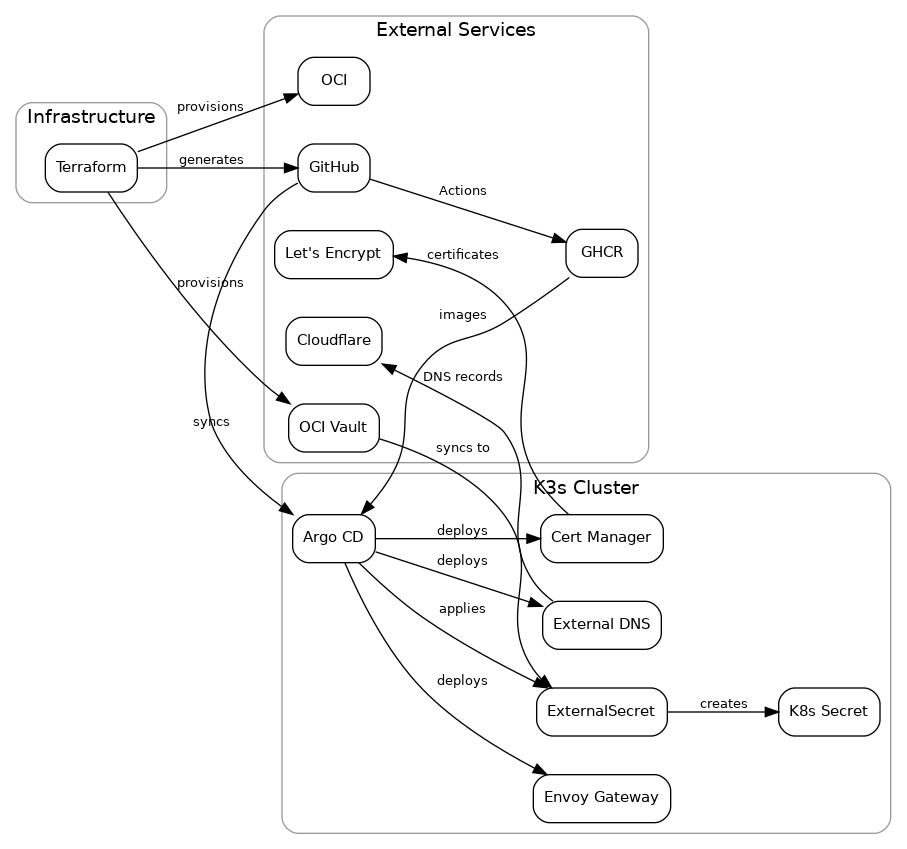
- Automatic DNS records in Cloudflare via ExternalDNS
- Automatic TLS certificates from Let’s Encrypt via cert-manager
- Secrets stored in OCI Vault, synced into Kubernetes via External Secrets
- Infrastructure managed end-to-end with Terraform
Architecture
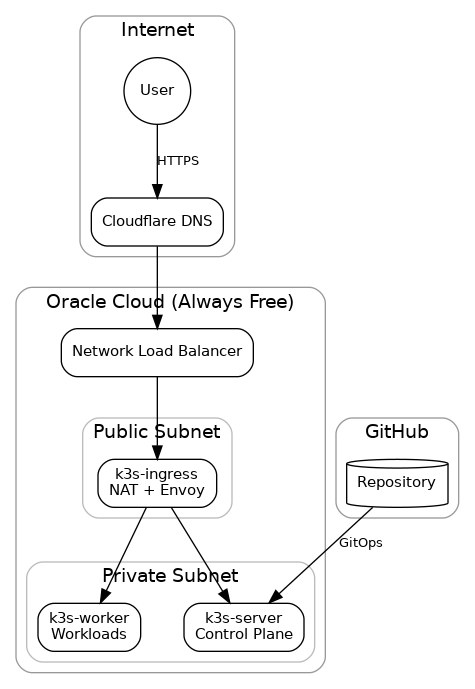
Traffic flow: User → Cloudflare DNS → OCI Network Load Balancer → Ingress/NAT node → K3s server + worker.
Node layout (Always Free–friendly)
The cluster runs on three Ampere A1 ARM64 instances within OCI’s Always Free limits (4 OCPUs, 24GB RAM total):
| Node | Resources | Subnet | Role |
|---|---|---|---|
| k3s-ingress | 1 OCPU, 6GB | Public (10.0.1.0/24) | NAT gateway, Envoy Gateway |
| k3s-server | 2 OCPU, 12GB | Private (10.0.2.0/24) | K3s control plane, Argo CD |
| k3s-worker | 1 OCPU, 6GB | Private (10.0.2.0/24) | Application workloads |
Why this split works well:
- Ingress node is the only publicly reachable VM and acts as the choke point for north–south traffic.
- Private subnet keeps the control plane and workloads off the public internet.
- NLB provides a stable front door for HTTPS traffic.
- You still get “real” Kubernetes primitives (Gateway API, cert-manager, ExternalDNS) without running a heavy stack.
Components
| Component | Purpose |
|---|---|
| K3s | Lightweight Kubernetes distribution |
| Argo CD | GitOps continuous delivery |
| Envoy Gateway | Gateway API implementation |
| ExternalDNS | Automatic Cloudflare DNS updates |
| cert-manager | Let’s Encrypt certificate automation |
| OCI Vault | Secrets storage (Always Free) |
| External Secrets | Sync Vault secrets to Kubernetes |
Here’s how provisioning + GitOps + runtime services connect end-to-end:
OCI Always Free resources used
This project stays inside the Always Free limits while still providing a usable cluster.
| Resource | Free Limit | Usage |
|---|---|---|
| Ampere A1 Compute | 4 OCPUs, 24 GB RAM | 4 OCPUs, 24 GB |
| Object Storage | 20 GB | ~1 MB (Terraform state) |
| Vault Secrets | 150 secrets | ~10 secrets |
| Vault Master Keys | 20 key versions | 1 key |
| Flexible NLB | 1 instance | 1 instance (ingress) |
Prerequisites
You’ll need:
- An OCI account with Always Free eligibility
- A Cloudflare account with a managed domain
- A GitHub account and Personal Access Token (PAT)
- Terraform installed locally
Quick Start
1) Create configuration
Create tf-k3s/terraform.tfvars:
tenancy_ocid         = "ocid1.tenancy.oc1..."
user_ocid            = "ocid1.user.oc1..."
fingerprint          = "xx:xx:xx..."
private_key_path     = "/path/to/oci_api_key.pem"
region               = "us-ashburn-1"
compartment_ocid     = "ocid1.compartment.oc1..."

ssh_public_key_path  = "/path/to/ssh_key.pub"
cloudflare_api_token = "your-cloudflare-token"
cloudflare_zone_id   = "your-zone-id"
domain_name          = "k3s.example.com"
acme_email           = "admin@example.com"

git_repo_url         = "https://github.com/your-user/k3s-oracle.git"
git_username         = "your-github-username"
git_email            = "your-email@example.com"
git_pat              = "ghp_..."

k3s_token             = "your-random-secure-token"
argocd_admin_password = "your-secure-password"
2) Deploy infrastructure + bootstrap the cluster
cd tf-k3s
terraform init
terraform apply
3) Push GitOps manifests
Terraform generates GitOps manifests that must be committed:
git add argocd/
git commit -m "Configure cluster manifests"
git push
4) Verify
After bootstrapping (usually a few minutes), verify Argo apps are syncing:
ssh -J ubuntu@<ingress-ip> ubuntu@10.0.2.10 "sudo kubectl get applications -n argocd"
CI/CD
GitHub Actions workflows handle linting and deployment.
| Workflow | Trigger | Purpose |
|---|---|---|
lint.yml | Pull requests | Run pre-commit hooks (markdownlint, yamllint, tflint) |
docker-publish.yml | Push to main (docs/) | Build Docker image, push to GHCR, restart docs pod |
GitHub Secrets required
For automatic docs deployment, add these secrets at Settings → Secrets → Actions:
| Secret | Value |
|---|---|
SSH_PRIVATE_KEY | Contents of your SSH private key (same key used in ssh_public_key_path) |
INGRESS_IP | Public IP of ingress node (from terraform output ingress_public_ip) |
Local development
pre-commit install
pre-commit run --all-files
Documentation
The full documentation is available at the live cluster site:
To view and edit the docs locally:
cd docs
bun install
bun start