Bare Metal Kubernetes Homelab Setup
ArgoCD, Tailscale, Envoy, Longhorn, Vault, and more!
A self-hosted bare-metal Kubernetes platform on Ubuntu 24.04 LTS. Combines Ansible for automated node provisioning with ArgoCD for GitOps-based cluster management. Traffic flows through Tailscale for secure ingress and Envoy Gateway for routing, with Vault and External Secrets handling credentials. Longhorn provides distributed storage. A local rehearsal workflow using Multipass VMs allows validating changes before deploying to hardware.
GitHub Repository: https://github.com/nsudhanva/homelab
Table of contents
- Features
- Architecture
- Quick start
- Documentation
- Repository layout
- Applications
- GitOps model
- Operations
- Conventions
- Monitoring topology
- Maintainers
Features
- Multi-node bare-metal Kubernetes with kubeadm and Cilium
- GitOps-managed infrastructure and apps via ArgoCD ApplicationSets
- Tailscale Gateway API ingress with split-horizon DNS
- Vault + External Secrets for centralized secret management
- Longhorn storage, Prometheus monitoring, and optional GPU plugins
- Automated image updates with ArgoCD Image Updater
- Metrics Server for resource usage in Headlamp
- ExternalDNS automation for Gateway API routes
- Envoy Gateway data plane for Gateway API
Architecture
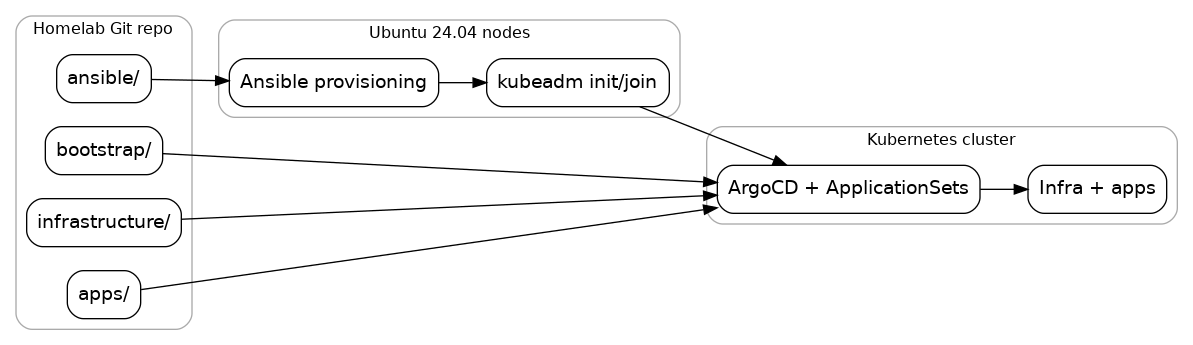
Core systems map
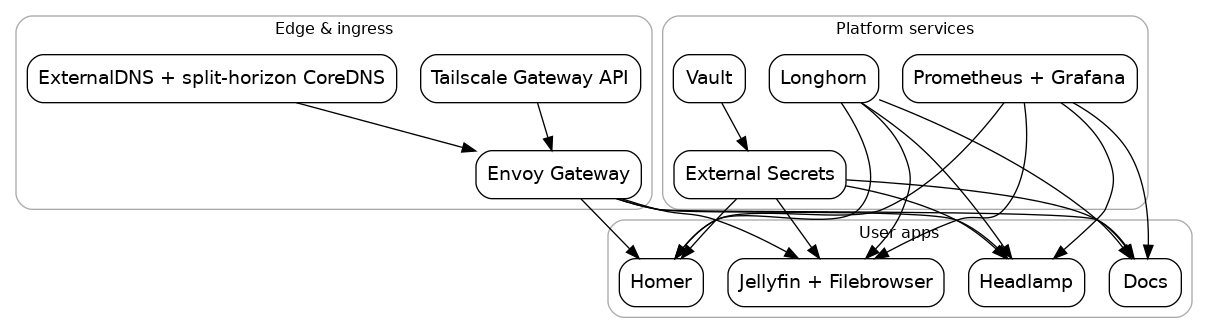
Platform services map
Network topology

Quick start
Bare metal is the primary target. The local VM flow exists to rehearse changes before touching hardware.
Bare metal bring-up
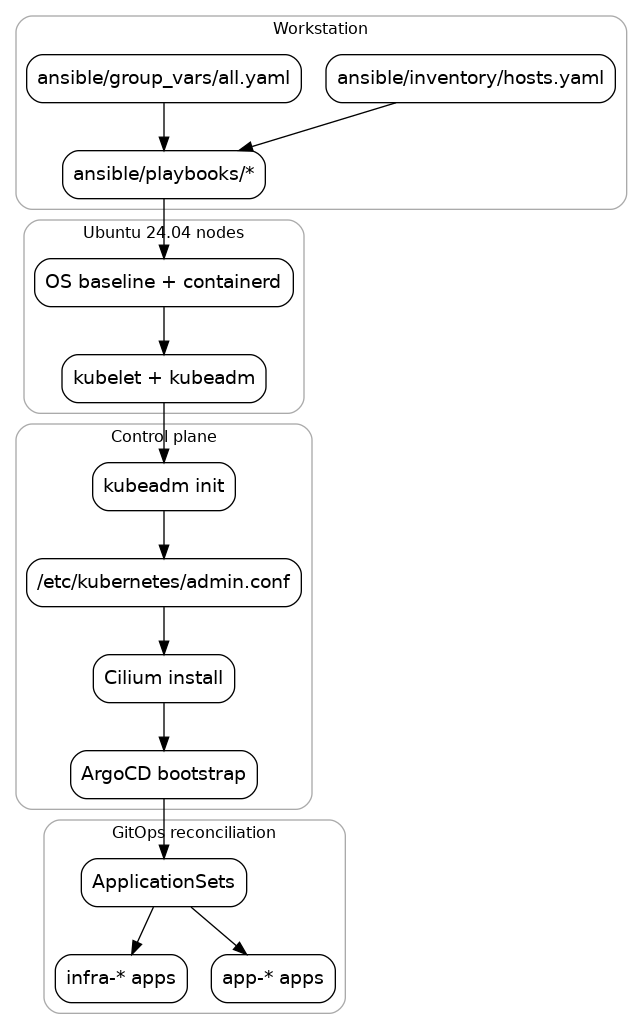
Provision nodes, bootstrap Kubernetes, then hand off to ArgoCD.
nano ansible/inventory/hosts.yaml
ansible-playbook -i ansible/inventory/hosts.yaml ansible/playbooks/provision-cpu.yaml

sudo kubeadm init --pod-network-cidr=10.244.0.0/16
mkdir -p $HOME/.kube
sudo cp -i /etc/kubernetes/admin.conf $HOME/.kube/config
sudo chown $(id -u):$(id -g) $HOME/.kube/config
kubectl taint nodes --all node-role.kubernetes.io/control-plane-

CILIUM_VERSION=$(grep -E "cilium_version:" ansible/group_vars/all.yaml | head -n 1 | awk -F'"' '{print $2}')
cilium install --version "$CILIUM_VERSION" --values infrastructure/cilium/values.cilium

kubectl apply -k bootstrap/argocd
kubectl wait --for=condition=available --timeout=600s deployment/argocd-server -n argocd
kubectl apply -f bootstrap/root.yaml
Guided flow: https://docs.sudhanva.me/docs/how-to/from-scratch and https://docs.sudhanva.me/docs/tutorials
From scratch flow
Local rehearsal
Use Multipass to validate the full flow on your workstation.
./scripts/local-cluster.sh up
Low-resource rehearsal:
WORKER_COUNT=0 VM_CPUS=2 VM_MEMORY=3G VM_DISK=12G CILIUM_HUBBLE_ENABLED=false ./scripts/local-cluster.sh up
Tear down:
./scripts/local-cluster.sh down
Documentation
Docs site: https://docs.sudhanva.me
Build locally:
cd docs
npm ci
npm start
Recommended reading paths:
- Start from scratch: https://docs.sudhanva.me/docs/how-to/from-scratch
- Prereqs and system prep: https://docs.sudhanva.me/docs/tutorials/prerequisites
- GitOps model: https://docs.sudhanva.me/docs/explanation/automation-model
- Infra catalog: https://docs.sudhanva.me/docs/reference/infrastructure-components
- App catalog: https://docs.sudhanva.me/docs/reference/applications
Repository layout
ansible/          Node provisioning
bootstrap/        ArgoCD bootstrap and ApplicationSets
infrastructure/   Cluster components managed by ArgoCD
apps/             User workloads managed by ArgoCD
clusters/         Cluster-specific overrides
scripts/          Automation helpers
docs/             Docusaurus documentation
Applications
| App | Purpose | Hostname |
|---|---|---|
| Docs | Docusaurus site for cluster documentation | docs.sudhanva.me |
| Headlamp | Kubernetes UI with OIDC support and metrics integration | headlamp.sudhanva.me |
| Homer | Home dashboard with service shortcuts | home.sudhanva.me |
| Jellyfin | Media streaming with GPU acceleration when available | jellyfin.sudhanva.me |
| Filebrowser | File manager for the media volume | filebrowser.sudhanva.me |
| ArgoCD | GitOps control plane UI | argocd.sudhanva.me |
| Longhorn | Storage UI | longhorn.sudhanva.me |
| Vault | Secrets UI | vault.sudhanva.me |
| Hubble UI | Cilium network visibility | hubble.sudhanva.me |
| Grafana | Metrics dashboards | grafana.sudhanva.me |
| Prometheus | Metrics queries | prometheus.sudhanva.me |
| Alertmanager | Alerting UI | alertmanager.sudhanva.me |
GitOps model
ArgoCD reconciles everything under infrastructure/ and apps/ using ApplicationSets. Manual kubectl apply is discouraged after bootstrap.
Adding apps:
- Create
apps/<app>/app.yamlto define the ArgoCD app name/path/namespace - Add Kubernetes manifests in the same folder
- Add
kustomization.yamlif you want Image Updater to write overrides
Image updates:
- ArgoCD Image Updater writes
.argocd-source-<app>.yamlfiles into app folders - These files are not Kubernetes resources and are ignored by kubeconform
Operations
Routine checks:
kubectl get nodes
kubectl get pods -A
kubectl get apps -n argocd
Before pushing:
pre-commit run --all-files
Conventions
- ApplicationSets generate
infra-*andapp-*ArgoCD applications from folders - App folders use
app.yamlfor app metadata and manifests in the same directory kustomization.yamlenables Image Updater overrides per app- Image updates write
.argocd-source-<app>.yamlfiles into app folders
Monitoring topology
